Feature Guide
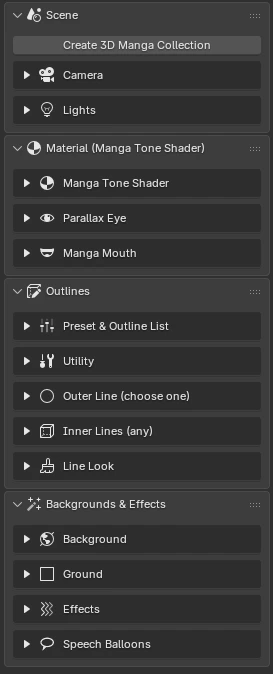
The "3D Manga Studios" tab in the Sidebar (N in the 3D Viewport) has four panels, in the order you work. Go through them from top to bottom and you'll have a finished panel.
1SceneCollections, Camera, Distortion Fix, Lights, Light Linking
2MaterialManga Tone Shader, Painterly and Transparency, Eyes, Mouth
3OutlinesPick by role, Presets, Line Look, Outline List
4Backgrounds & EffectsBackground, Ground, Effects, Sky and Clouds, Speech Balloons, Sound Effect Text
Panels
- Scene
- 3D Manga Collection
- Camera (Lens Details, Resolution, Guides, Distortion Fix)
- Lights (Light Linking)
- Material (Manga Tone Shader)
- Basic Settings (feature toggles, Painterly, Transparency)
- Eyes
- Mouth
- Outlines
- ① Outer Line ② Inner Lines ③ Line Look
- Presets and Outline List
- Backgrounds & Effects
- Background
- Ground
- Effects (Sound Effect Text)
- Sky and Clouds
- Speech Balloons
Tip
The add-on assumes one panel per .blend file: one camera, and one background per scene.